Most worksheet sites hand you a finished PDF and hope it fits. This one doesn’t work that way — you build the sheet, which means it matches exactly what your student has been taught. Here’s how it works.
1. Pick the skill
Start with what your student is working on this week, not a grade level: short vowels, the -at word family, this week’s spelling list, subtraction within 20, cursive letter formation, sentence fragments. Every skill has its own page, and each one opens with the options already set to something sensible — so if you’re in a hurry, you can generate a usable sheet without changing anything.
2. Set the options — this is the part that matters
This is where a generated worksheet beats a downloaded one. Depending on the subject, you control things like:
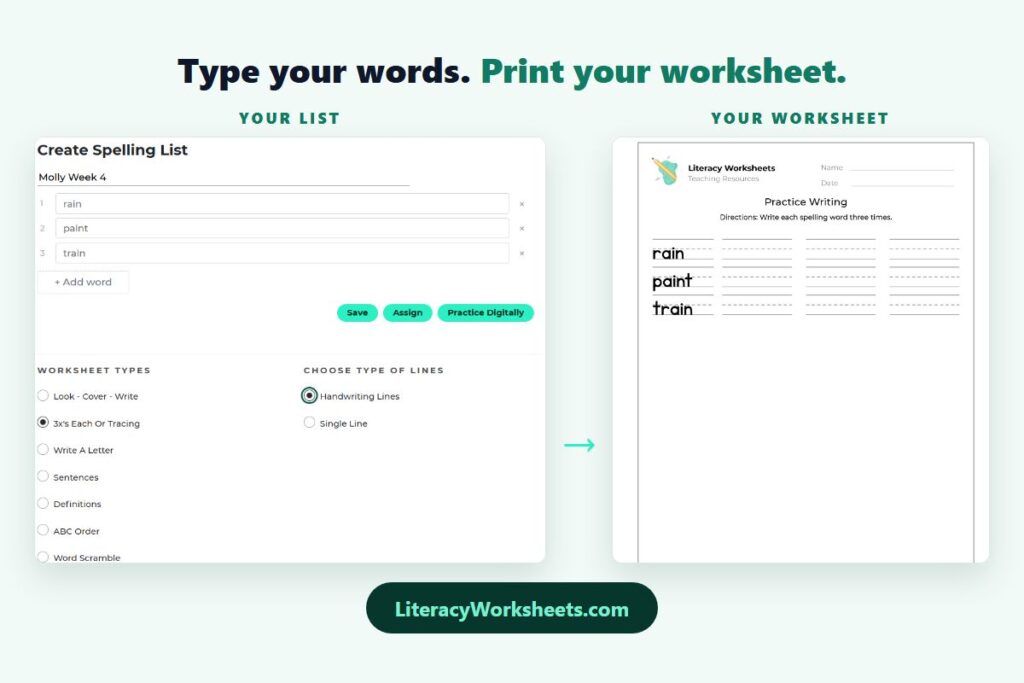
- Your own words. Type in this week’s spelling list, your vocabulary terms, or your student’s name, and the worksheet is built from those instead of someone else’s list.
- How many problems. Fewer questions for a student who shuts down at a full page; more for a student who needs the repetition.
- The exact sounds or facts. Only the letters you’ve taught. Only the times tables you’re on. Nothing your student hasn’t seen yet.
- Supports on or off. Word banks, picture clues, handwriting lines instead of single lines, fewer answer choices — the accommodations that make a sheet accessible without changing what it’s teaching.
Change an option and the preview updates so you can see the sheet before you commit to paper.
3. Generate, check, print
Hit generate and you get a fresh worksheet — and “fresh” is literal. Generate the same skill again tomorrow and the problems are different, so a student can practice the same concept all week without memorizing the page instead of the material. Sheets that need an answer key come with one, so you’re not solving thirty problems yourself to grade a stack.
What you can make
The generators cover reading and writing — phonics, letter sounds, sight words, spelling, vocabulary, comprehension and novel studies, handwriting, and writing — plus Common Core math from counting through fractions.
There’s also a set of visual supports for special education: visual schedules, First/Then boards, token boards, choice boards, communication boards, social stories, feelings charts, and calm-down scales. Those print in English or Spanish, so home and school can use the same materials even when they don’t share a language. And if you collect data, there are ABC charts, behavior frequency sheets, task analyses, and IEP goal trackers too.
Save what works
Make a free account and you can save a worksheet you liked, come back to it later, and generate a new version of the same setup without rebuilding it. Teachers can also create a class, add students, and assign work digitally — students log in with a class code and a first name, no email addresses required.
A few ways teachers actually use it
- Homework that matches the lesson. Generate practice on exactly what you taught that day, not what a publisher guessed you’d teach.
- Three versions of the same page. Same skill, different problem counts and supports, so every student gets something they can finish.
- A sub folder that never goes stale. Print a stack of review sheets in August and leave them in the drawer.
- Fluency practice all week. A new sheet each day on the same skill, so the practice is real rather than memorized.
All of it is free. No trial, no watermark, no page limit — I built this because as a special education teacher I spent hours every night hunting for a worksheet that almost fit, and I wanted the version where you just make the one you need. Pick a skill and try it — the first sheet takes about a minute.